Concerns among gamers are growing following analysis suggesting that running the 'Goddess of Victory: Nikke' PC launcher may have allowed PCs to be controlled remotely. Official server files loaded by the game's launcher were tampered with, creating a massive security vulnerability. Because this issue did not stem from any fault of the players themselves, anxiety is mounting over whether individual systems have already been infected.
A detailed technical report analyzing the situation, published by GitHub user 'MotherSphere', has served as the foundation for identifying the problem and formulating countermeasures. Based on that report, we have summarized the core details to make them easier to understand.

Tampering of 4 Official Server Files in the Launcher How Files Turned into Remote Control Tools
First, let's look at the launcher. As the gateway passed before launching the game, players naturally run it to play. Every time the launcher is opened, it fetches and executes several JavaScript files from official servers. Put simply, the launcher is structured to pull fresh components needed for operation from an official warehouse each time.
A Content Delivery Network (CDN) serves as this warehouse. It is a distribution network that replicates the same files across multiple regional servers to deliver files quickly to users worldwide. The starting point of this incident was the alteration of four files hosted on Level Infinite's official CDN.
The modified files are aegis-fix.min.js, vue-bucket.min.js, images.7fec4c32.js, and FeedList.feb647c9.js. According to server logs, the report explains that all four were modified within a span of just over a minute between 6:41 and 6:42 GMT on September 27.
The method of modification was simple. Short commands were inserted into legitimate files so that when the launcher executed them, it would simultaneously load a script from an external address (insightjs.com) set up by the attacker. The address was obfuscated using an array of numbers rather than plain text, and was designed to fall back to a .org domain if blocked. In particular, for FeedList.feb647c9.js, the added ~700 bytes were inserted right before the closing statement rather than at the very end of the file. The report notes this location is easy to miss with checks that only inspect file endings.
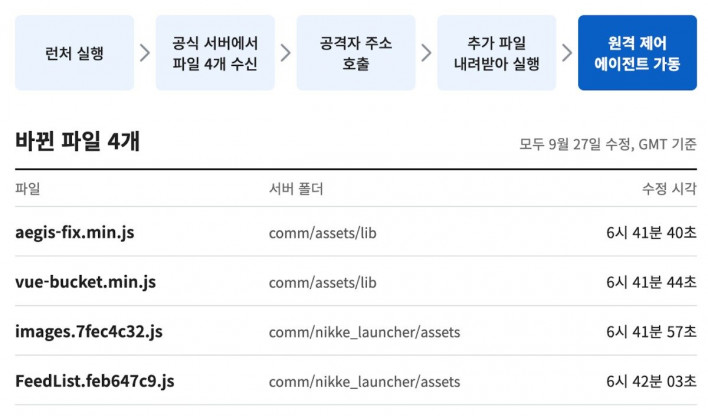
The next step is the download. The retrieved script leverages the launcher's built-in download feature to fetch a file named 'insight.bundle' from the attacker's server. This file is saved inside the launcher folder with a .log extension to look like a log file, executed, and immediately deleted.
What is downloaded and executed is a remote access agent. Rather than a one-time info-stealer, it functions as a remote-control tool that periodically connects to the server while awaiting commands from the attacker. This makes it far more dangerous. On the PC analyzed in the report, it connected to the server roughly every 30 minutes, with a margin of error of around plus or minus 6 minutes.
This agent operates only while the launcher is open. However, players frequently leave the launcher minimized to the system tray while gaming, and the report cites a case where an agent connected to the server 22 times over a 9-hour period. The real problem lies in the scope of what this agent can do.
How Far Does the Risk Extend? What Can the Agent Do?
The core command among those available to the attacker is 'exec'. It executes any program and returns the output, effectively granting the attacker the same permissions as the user account. This enables installing additional malware, viewing documents, and modifying files. The remaining commands can be described as shortcuts designed to facilitate these operations.
The shortcut commands cover a wide variety of functions. They include commands to browse folders and download files, take screenshots across multiple monitors, and extract saved information from Windows Credential Manager. Commands to read passwords stored in Google Chrome, Edge, Brave, Vivaldi, Opera, and Firefox, as well as commands to harvest data from 28 browser-extension crypto wallets, are also included. There were also commands to collect basic system information such as computer name, username, Windows version, storage devices, and network adapters.
In addition, a feature automatically scans 264 file paths. The list is packed with entries familiar to developers: SSH (Secure Shell) keys for remote access, configuration files for GitHub, Docker, and Kubernetes, cloud access credentials for Amazon Web Services and Google Cloud, and authentication files for AI coding tools such as Claude Code, Codex, and Gemini command-line tools. Command history and .env config files within project folders are also targeted. Essentially, any file readable under the user account falls within the risk zone.
The report also pointed out that the agent configuration contained a value to turn off cookie collection. However, this setting is merely an option within the command that reads browser information, and stored passwords can still be read even when it is turned off. Since cookies are used to maintain logged-in states without entering a password, and cookie files could be copied in their entirety using file-reading commands, this does not mean cookies were safe.
Another problem is that detecting damage is difficult. The only command that launches a new program is 'exec', while all other commands are processed directly within the launcher program itself. As a result, no traces are left in Windows Prefetch records or process creation logs. Command histories are not logged in launcher logs either, making it impossible for users to verify which commands the attacker executed.
For Windows systems with Chrome installed, there is an additional risk. The agent uses a 'chrome_install' command to plant a DLL file loaded by Chrome, which continues to operate whenever Chrome launches—even after closing the game launcher. The report noted that this DLL captures passwords entered on web pages and recovery phrases for crypto wallets, though this section was categorized as reported user feedback because it could not be directly verified. While not definitive, the cause for concern remains.
Furthermore, the report cites cases where Microsoft Defender Offline Scan failed to detect this DLL, making it hard to rely solely on clean antivirus scans for peace of mind. The DLL also appears to be compiled uniquely per victim, meaning it cannot be identified by file hash alone and must be located via specific folder paths and registry keys.
Players running Nikke via Proton on Linux or Steam Deck are not safe either. While Windows automated collection paths are mostly empty in a Proton environment, Proton uses Wine, which maps the Linux home directory as a drive. As a result, remote commands can still read SSH keys, browser profiles, and configuration files containing API keys inside the home folder. Environment variables are also passed directly to the agent, so the report notes that all secrets stored in the home directory and environment variables must be assumed exposed. The Chrome DLL mechanism applies only to Windows.
Tampering Spanning Over 5 Weeks From September to November Replacement
What has happened so far? The earliest confirmed record is September 27. The insightjs.com domain used for the attacker's server was registered at 1:59 GMT, and nearly five hours later, at 6:41 GMT, official CDN files began to be altered.
The report places the start of agent activity at October 24 at the latest. On October 28, FeedList.feb647c9.js was replaced with a legitimate file at the origin server, but the remaining three files remained tampered with until November 3.
The public warning came on November 3. The report logs a post in the Nikke community Discord at 16:11 GMT as the first public warning. Subsequently, aegis-fix.min.js was replaced with a legitimate file at 17:04, vue-bucket.min.js at 17:13, and images.7fec4c32.js at 17:21.

The attacker's server also changed around the same time. At 17:30, the script fetched by the tampered files was replaced with a script that resembled a page-speed analysis tool without download capabilities, and by 18:31, the researcher's PC could no longer connect to the server. However, insight.bundle remained downloadable as of 17:30.
The remaining issue involves FeedList.feb647c9.js. Even though the origin file was fixed on October 28, two CDN servers were still delivering the tampered version as late as 22:26 GMT on November 3. The report notes that requesting the file with arbitrary cache-busting parameters attached to the URL still returned the altered copy.
However, fixing the server files does not remove agents or Chrome DLLs that have already been installed. Modified files may also persist in the launcher cache on user PCs, so the report advises clearing the cache folder before opening the launcher again.
Under these circumstances, are other Level Infinite titles safe? So far, confirmed damage across reports and coverage is limited to the Nikke PC launcher. No evidence has surfaced indicating that launchers for other games were compromised in the same manner.
However, there is no definitive proof of safety either. The tampered files were hosted on Level Infinite's official CDN rather than a Nikke-exclusive server, and how the attacker gained access to this repository or distribution pipeline remains unknown. Whether this access was restricted to Nikke or extended across Level Infinite as a whole remains the central unknown. The report also highlights that other files within the same repository may have been altered, recommending cross-checking against build outputs.
There are circumstantial indicators. Two of the four modified files were located in a Nikke-specific folder containing 'nikke_launcher' in its path, but the other two were in a directory (comm/assets/lib) that appeared to be a shared library with no reference to Nikke. Additionally, the report noted that a temporary file initially listed as an indicator of compromise—and later corrected—was also present with identical name and content in a September 20 Wine environment for Delta Force, prior to the tampering. The report concluded this file was created by Tencent software rather than evidence of infection. While Nikke and Delta Force appear to share certain Tencent software components, whether they load the same CDN files has not been confirmed. This underscores the need for swift verification at the corporate level.
Counter-evidence exists as well. The agent contains clear signs of being custom-tailored for Nikke, such as targeting the Nikke launcher folder for data harvesting and storing status info at a Nikke launcher-specific address. While it seems unlikely to work directly on other game launchers, this reflects a limitation of this specific payload, not necessarily a limit on the attacker's access privileges.
Meanwhile, the fallback domain insightjs.org set up by the attacker has already been taken over. At 17:55 GMT on November 3, a third party registered the domain and replaced it with a security advisory page regarding the Nikke PC launcher compromise.
Is My PC Infected? What to Do Now From Verification to Blocking, Removal, and Password Reset
What should players do now?
First, check for infection. While modified files could be delivered to anyone running the launcher, the actual malware payload was retrieved in only a fraction of launcher executions. The report notes a case where running one user's launcher approximately 19 times delivered the agent only 3 times.
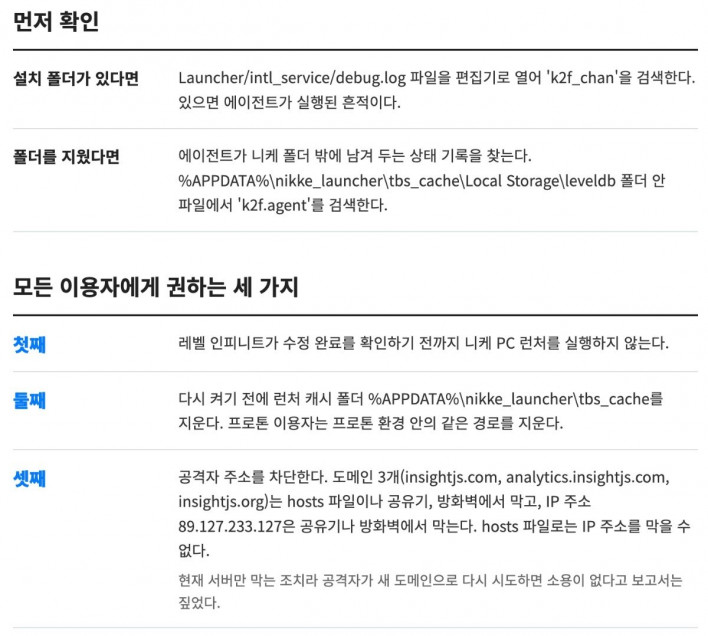
You can check if your PC is affected by opening 'Launcher/intl_service/debug.log' inside the Nikke installation folder and searching for 'k2f_chan'. The presence of this string indicates that the agent has executed. If you deleted the folder or reinstalled the game, the log file will be gone; in that case, search for 'k2f.agent' inside the files in '%APPDATA%\nikke_launcher\tbs_cache\Local Storage\leveldb'.
The report recommends three steps for all players. First, do not run the Nikke PC launcher until Level Infinite confirms a complete fix. Second, delete the launcher cache folder at '%APPDATA%\nikke_launcher\tbs_cache' before launching it again. Proton users should clear the corresponding path within their Proton prefix.
Third, block the attacker's addresses. Block three domains (insightjs.com, analytics.insightjs.com, insightjs.org) via your hosts file, router, or firewall, and block IP address 89.127.233.127 via router or firewall (the hosts file maps domain names and cannot block IP addresses). Note that this only blocks current servers; the report warns that if the attacker attempts another attack using new domains, these blocks will not suffice.
To edit your hosts file, run Notepad as administrator, open 'C:\Windows\System32\drivers\etc\hosts', and add the three domains at the bottom—one per line—such as '0.0.0.0 insightjs.com', then save.
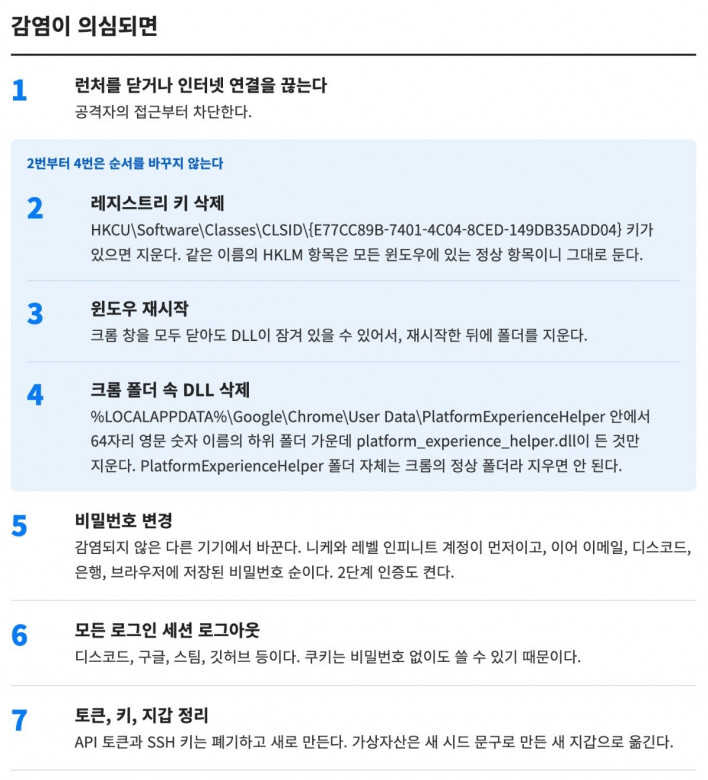
If you suspect infection, order of operation is critical. First, close the launcher or disconnect from the internet to block remote access. If Chrome is installed on Windows, delete the registry key 'HKCU\Software\Classes\CLSID\{E77CC89B-7401-4C04-8CED-149DB35ADD04}' first, then restart Windows.
To access the registry, run 'Registry Editor' from Windows search, navigate to the path above, select the specified key, and delete it. Take care not to delete keys with similar names.
Next, inside the 'PlatformExperienceHelper' folder within Chrome's User Data directory, locate the 64-character alphanumeric subfolder containing 'platform_experience_helper.dll' and delete only that DLL. Do not delete the PlatformExperienceHelper folder itself, as it is a legitimate Chrome directory, and ensure you delete only under HKCU, as identical CLSID entries exist under HKLM as standard system keys. A system restart is required because the DLL may remain locked even after closing all Chrome windows.
The report highlights a clean Windows reinstallation as the safest resolution, since the attacker could have executed arbitrary commands while the agent was active.
Instead of the Chrome DLL removal procedure, Linux and Steam Deck users should assume all secrets in home directories and environment variables have been exposed, and proceed to rotate passwords, SSH keys, and API tokens.
Subsequent actions should be performed from an uncompromised device. Change your Nikke and Level Infinite account passwords first, followed by passwords for email, Discord, banking, and any credentials saved in browsers. Enable two-factor authentication (2FA) and log out of all active sessions across services like Discord, Google, Steam, and GitHub, as session cookies enable unauthorized access without passwords. Developers must revoke and recreate API tokens and SSH keys for GitHub, AWS, and similar services, while cryptocurrency assets should be transferred to a new wallet created with a fresh seed phrase.
However, as these recommendations are based on the security report, players should follow official guidance from the publisher once formal announcements are released.
Compromise Through No User Fault Concerns and Remaining Challenges
The most alarming aspect of this incident is that it occurred through no fault of the users. Players did not download suspicious files or run untrusted applications; rather, files fetched by the official launcher from official servers were modified. This represents an attack vector that is nearly impossible for users to detect in advance.
There is also the risk that damage may extend beyond gaming accounts. Because harvested targets included developer keys, cloud credentials, and AI coding tool authentication files, any gaming PC holding work-related credentials could potentially compromise enterprise environments.
Much remains unresolved. It is still unknown how the attacker obtained write access to Level Infinite's CDN. The report speculates that the attacker accessed the CDN repository or the distribution pipeline, warning that failing to identify and block this access could allow modified files to be uploaded again using new domains.
The actual extent of damage and data exfiltration remains unconfirmed as well. As discussed earlier, because command histories are not logged, infected systems must assume the worst-case scenario. This underscores the urgent need for a swift investigation and remediation by publisher Level Infinite.