If you want one particular RIVALS skin, save your Skin Tickets for an eligible Daily Shop offer. A Skin Case makes more sense when you would enjoy several of its possible results. Both routes can use the same ticket budget, but only the named shop offer tells you exactly which appearance you are getting.
Start with the weapon you actually use. A new look for your regular loadout is easier to judge than a cosmetic for a gun you rarely equip. Once you have a target, check whether it is available through the Daily Shop, a case or a different release route.
If you would rather compare paid offers for that target, browse a rivals shop with the exact skin or case name in mind. Read whether the listing delivers the named cosmetic, an unopened case or a bundle. Paying for a case gives you the case and its random outcome, so do not treat its promotional artwork as a promise of one particular skin.
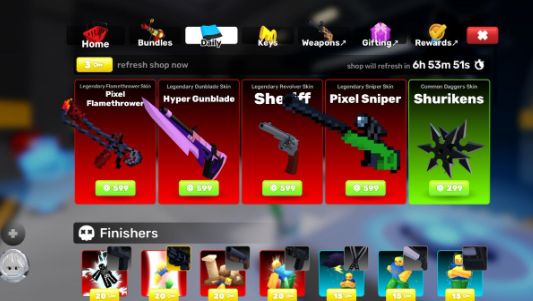
The Daily Shop shows named weapon skins, individual prices and a refresh timer. This June 2025 screenshot illustrates the interface rather than current stock or prices. Game: Nosniy Games / Roblox. Screenshot via Pro Game Guides.
What your tickets can buy
Skin Tickets can pay for Skin Cases or eligible skins in the Daily Shop. Roblox Den's ticket guide documents a 10-ticket cost for these purchases and shows where the ticket option appears. Check the current purchase panel, particularly for seasonal items or other cosmetic categories, rather than assuming every shop item uses the same price.
| Your goal | Better starting point | What to inspect |
| One specific appearance | A named eligible Daily Shop skin | Exact skin and matching weapon |
| Several appealing possible skins | A Skin Case | Its actual contents and random result |
| A skin outside the current offers | Keep the tickets while checking its source | Whether it can appear through that route |
| More usable weapon choices | Review weapon unlocks separately | Whether you need a weapon or a cosmetic |
For example, suppose you have 10 tickets and want only one skin from a case. Spending them on that case commits the whole balance to a random result. If several outcomes would make you happy, the same purchase has a different appeal. Decide which situation describes you before opening the purchase window.
Why the ticket option may disappear
A manual Daily Shop refresh using Keys changes the payment options as well as the selection. The RivalWiki skins reference notes that ticket payments are unavailable after a manual refresh until the next natural daily rotation. If you intend to spend tickets, inspect the existing offers before using Keys to replace them.
Also check your balance and the product type. The ticket button can be absent when you have no tickets, and seeing a payment option does not mean you have enough to complete it. Read the displayed cost. If the live interface differs from an older guide, use the current panel and the developer's update information to establish what changed.
Repeatedly refreshing is a poor troubleshooting method: it spends another resource while leaving the ticket restriction in place. If you have already refreshed manually, wait for the natural rotation before checking that payment route again.
Earn toward a target rather than a moving wishlist
The Season Pass provides ticket rewards on its free and paid tracks. Inspect the current track to see what you can claim and how much progress remains. Prime Goodie Bags can contain additional tickets, but their contents are random; do not count an unopened bag as a fixed payout.
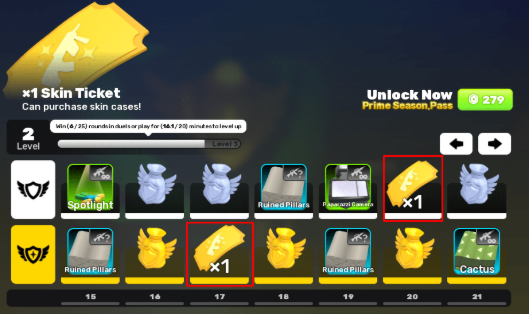
Skin Ticket rewards shown on a RIVALS Season Pass track. Reward placement and season contents can change; use the current track to plan the remaining progress. Game: Nosniy Games / Roblox. Screenshot: Roblox Den.
Keep codes in a separate column when planning rewards. Pocket Tactics' RIVALS codes guide lists rewards such as Keys and wraps. A code that awards Keys does not close a Skin Ticket shortfall. Read the actual reward before adding it to your plan.
That check applies across Roblox games. A code, an avatar promotion and a creator Star Code are different systems, as Inven Global explains in its guide to identifying maintained Roblox code lists. When moving between experiences, verify the game, reward and current status instead of assuming every freebie adds the currency you need.
When a Robux purchase fits the plan
If the live shop has your chosen skin and its Robux price fits your budget, calculate the gap against the balance you can already spend. You can then buy Robux for that planned purchase, checking the delivery method, amount received and estimated timing first. A balance delivery and an in-game gift are different offers; choose the one that actually provides what your purchase needs.
Robux can fund purchases in other Roblox experiences too, so reserve any amount you already intend to spend elsewhere. If a chosen RIVALS item costs 600 Robux, you have 400 available and want to keep 150 for another game, the shortfall is 350. Those are illustrative numbers, not a quoted RIVALS shop price.
If delivery could take longer than the offer has left, leave room for the rotation to change. Buying a balance does not hold a Daily Shop item in place. You can keep the funds for another planned purchase rather than spend them immediately on a replacement you do not really want.
Check the outcome before you confirm
Return to the same question at checkout: do you want this particular skin, or an opening from this particular case? Verify the weapon, product name and payment amount. After receiving the item, check your inventory and equip the cosmetic on its matching weapon. A smaller collection of deliberate choices is easier to enjoy than a string of purchases made because something was about to rotate out.

Guest Reporter
desk@invenglobal.com