
Last Epoch Beginner Guide
Common obstacles new players face and how to solve them
Quick Navigation
01. Changing Mastery02. Skill & Passive Respecs03. Campaign Progression04. Character Growth05. Crafting06. Gear Selection07. Mana Shortages 08. Survival09. Intro to Endgame
01 · Changing Mastery
I don't like my Mastery as much as I thought I would! How do I change it?
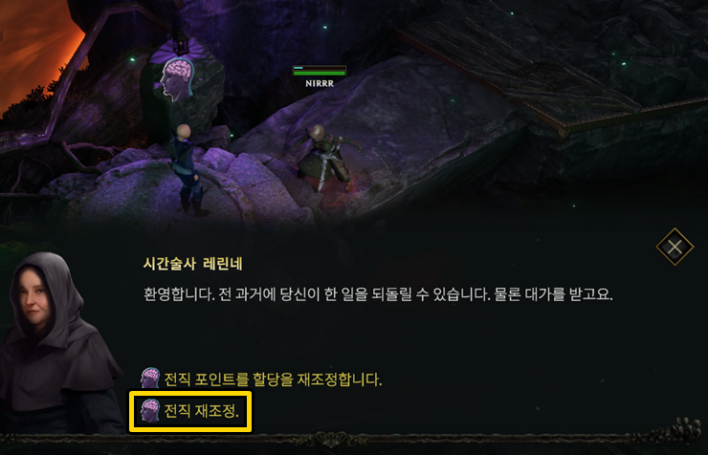
Previously, changing your Mastery within the same class was not possible, but starting from Season 2, resetting your Mastery has been made available. You can change your Mastery by visiting 'Chronomancer Lerinne', marked by a purple brain icon in [The End of Time Era - The End of Time], and paying gold. Note that while Lerinne appears in other locations, you must travel to The End of Time specifically to change your Mastery.
However, since Last Epoch does not yet offer a preview feature for Masteries, there is still a chance you might not like your newly chosen Mastery either. Carefully review each Mastery's skills, passive bonuses, and passive skill trees to pick the right one for you and save your gold.
However, since Last Epoch does not yet offer a preview feature for Masteries, there is still a chance you might not like your newly chosen Mastery either. Carefully review each Mastery's skills, passive bonuses, and passive skill trees to pick the right one for you and save your gold.
02 · Skill & Passive Respecs
How do I respec skills and passives? Is there any penalty?

Both active skills and passive skills can have their points refunded or reset at any time, but the processes differ slightly.
First, for active skills, open the skill panel, click on the slot containing the skill you want to reset, and press 'Respecialize' in the upper right. Here, you can choose whether to remove skill points or completely despecialize the skill. Removing a skill point does not refund the point; instead, it literally reduces the skill level by 1, requiring you to gain EXP again to earn that point back.
Conversely, despecializing a skill is used when you want to replace it with a completely different skill. Be careful, as re-equipping the exact same skill immediately will not restore lost skill levels. The level of a newly equipped skill starts at the minimum skill level and gradually scales up based on your character level.
To respec passive skills, visit Chronomancer Lerinne in areas such as [The Ruined Era - The Council Chambers] or [The End of Time Era - The End of Time] and click 'Respecialize Passive Point Allocations'. You can pay gold to refund as many points as you want and immediately invest them into new passives.
First, for active skills, open the skill panel, click on the slot containing the skill you want to reset, and press 'Respecialize' in the upper right. Here, you can choose whether to remove skill points or completely despecialize the skill. Removing a skill point does not refund the point; instead, it literally reduces the skill level by 1, requiring you to gain EXP again to earn that point back.
Conversely, despecializing a skill is used when you want to replace it with a completely different skill. Be careful, as re-equipping the exact same skill immediately will not restore lost skill levels. The level of a newly equipped skill starts at the minimum skill level and gradually scales up based on your character level.
To respec passive skills, visit Chronomancer Lerinne in areas such as [The Ruined Era - The Council Chambers] or [The End of Time Era - The End of Time] and click 'Respecialize Passive Point Allocations'. You can pay gold to refund as many points as you want and immediately invest them into new passives.
03 · Campaign Progression
I don't know where my quest objectives are or how to get there!
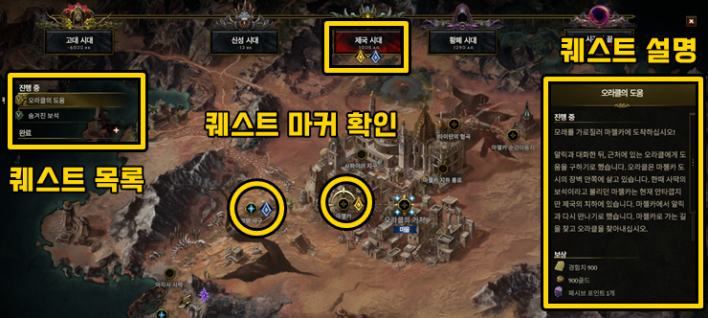
Opening the map (M) displays era selections at the top along with gold and silver quest markers. Gold markers represent main quests, while silver markers denote side quests. Click on an era with an active quest to see which map you need to travel to in order to complete the objective.
Clicking a quest title under 'In Progress' on the left side shows detailed information about what to do and what rewards you will receive, so give it a read if you ever get stuck.
04 · Character Growth
It feels like I have fewer passive points and idol slots than other characters!
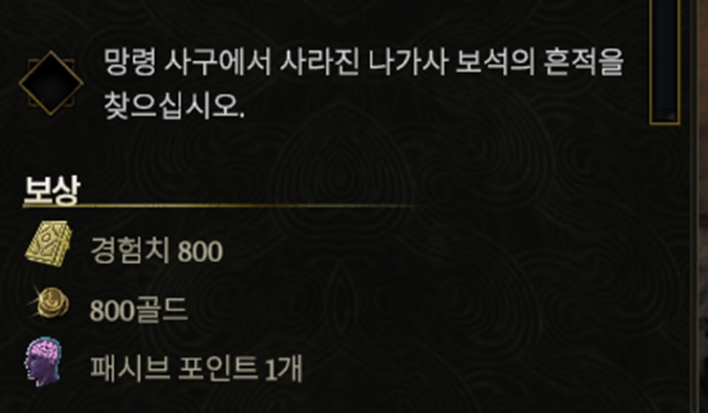
Among the side quests you might skip out of inconvenience, some reward you with passive points and idol slots. If your character feels noticeably weaker and less geared than others of the same level, chances are high that you skipped these side quests.
Open the map (M) and look at the bottom left to check how many passive points and idol slots you can obtain versus how many you have earned so far, and make sure to claim them all.
05 · Crafting
The craft button is disabled and I can't craft gear anymore!
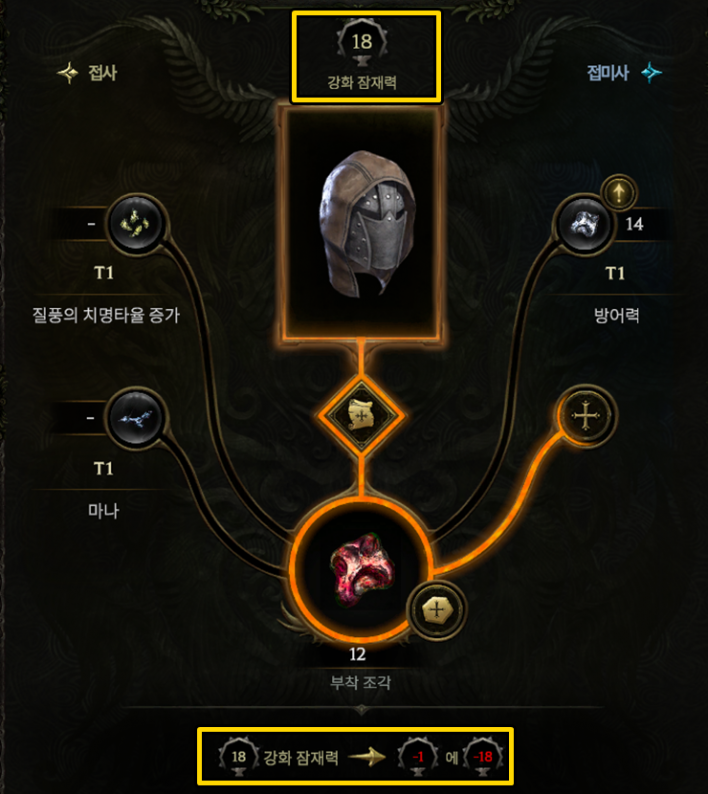
When upgrading normal items at the Forge, 'Forging Potential' is consumed. Once an item's Forging Potential reaches 0, it can no longer be upgraded. Forging Potential decreases randomly within a set range each time you craft.
Alternatively, the item you are trying to craft on might be a Unique item or a Weaver's Will item. When combining 1 Unique item and 1 Exalted item to craft a Legendary item, the Unique item must have at least 1 Legendary Potential remaining. In the case of Weaver's Will items, gaining Weaver's Will removes both Forging Potential and Legendary Potential, making them unusable for crafting in the first place.
06 · Gear Selection
I'm not sure what makes good gear!
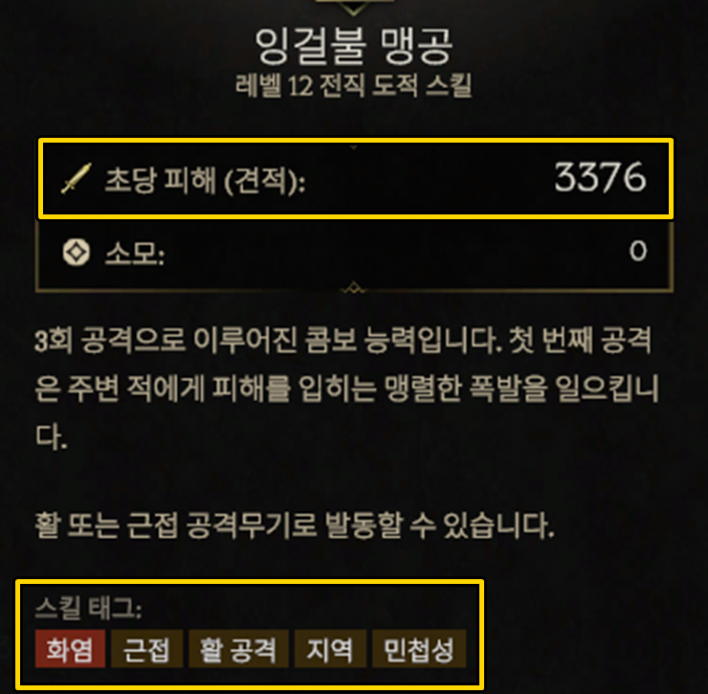
When gear with a high item level or high rarity drops, you might find yourself hesitating. It can be confusing whether you should always swap gear just because it has a higher level or rarity, but the first thing to check is 'whether the affixes are useful for my build'. If you primarily use physical skills, an item with stats like spell damage is naturally useless even if its item level is high.
Hovering your mouse over a skill icon displays the scaling tags that affect that skill, and you can see your DPS change when swapping gear. If you don't want to overcomplicate things, simply swap gear and check how your DPS changes.
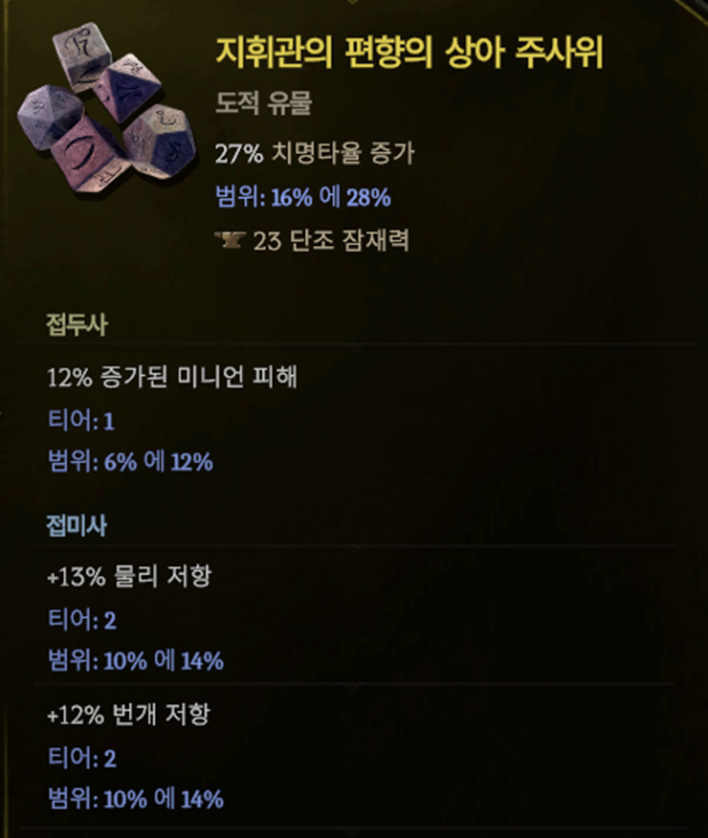
Going a step beyond raw damage, something deeper to check is the item's growth value. This includes how many open affix slots remain for adding shards, the affix tiers, and the stat roll ranges. In particular, Tier 6 and Tier 7 affixes cannot be obtained through crafting, so if an item drops with high-tier affixes and the remaining stats are usable, it is worth equipping or crafting on. You can check affix tiers and stat ranges by pressing Ctrl + Alt.
Once you enter the endgame, survival stats become just as important as offensive stats, so keep that in mind as well.
07 · Resource Management
I keep running out of mana and can't attack!
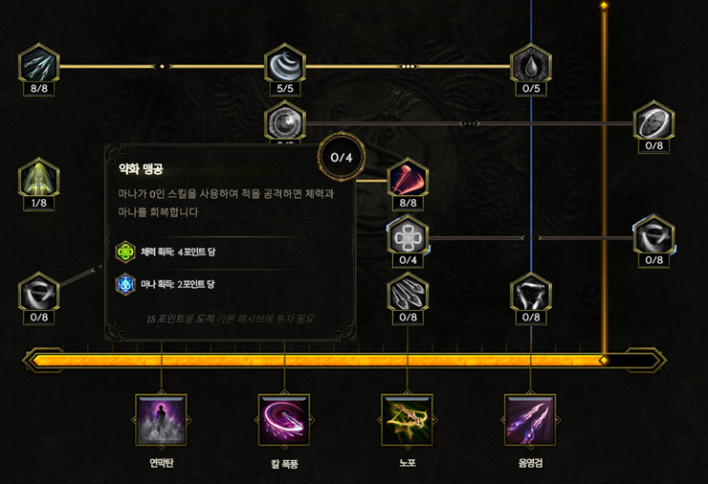
If you frequently run out of mana while using skills, start by checking your skill rotation. Your rotation might be filled only with heavy mana-cost skills while lacking 0-mana-cost skills. A skill with zero mana cost isn't necessarily weak. Combining low-cost or 0-cost skills with high-mana skills properly is essential for maintaining steady combat.
The second thing to inspect is skill specialization. Many specialization nodes offer options to boost a skill's power at the expense of higher mana cost. Over-investing in these nodes can spike your burst damage, but it drains your mana quickly, making continuous attacks difficult. Passives, specialization nodes, and gear affixes also offer effects that reduce mana cost or aid recovery, so investing in those options is another good solution if you face frequent mana shortages.
Additionally, it's helpful to understand Last Epoch's unique mana system. The mana system in Last Epoch features a "debt" mechanic. Even if a skill's mana cost is higher than your current mana, you can still cast it once, pushing your mana into negative numbers by the missing amount. While your mana is negative, you cannot use regular mana-costing skills, so you must use 0-mana-cost skills while waiting for mana to regenerate. Therefore, the higher your build's mana costs are, the more important it is to include 0-mana-cost skills in your setup.
08 · Survival
I used to be fine, but suddenly I keep dying!
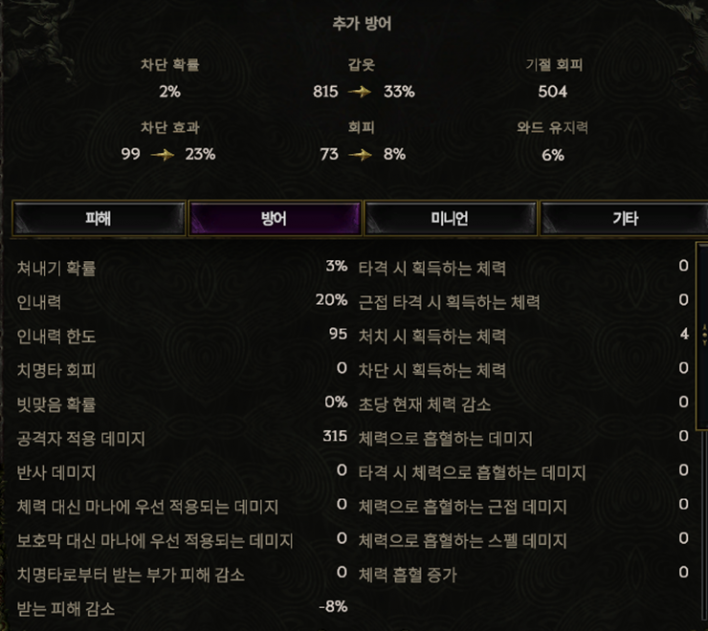
In the early game, focusing solely on offensive stats that boost damage is fine, but beyond a certain point, your character might start dying in the blink of an eye. Even outside of Hardcore mode, dying in the endgame prevents you from receiving good rewards, so securing defensive options is necessary. You can check detailed figures in the [Character (C) - Defense] menu.
First, identify the primary survival layer used by your build. Various defensive mechanics exist—such as Armor, Block, Dodge, Ward, and Endurance—and some builds stack multiple survival layers simultaneously. For most builds, securing Health and Resistances boosts stability, so if you're unsure, starting with those will help.
09 · Intro to Endgame
I reached the Monolith of Fate, but I don't know what to do!
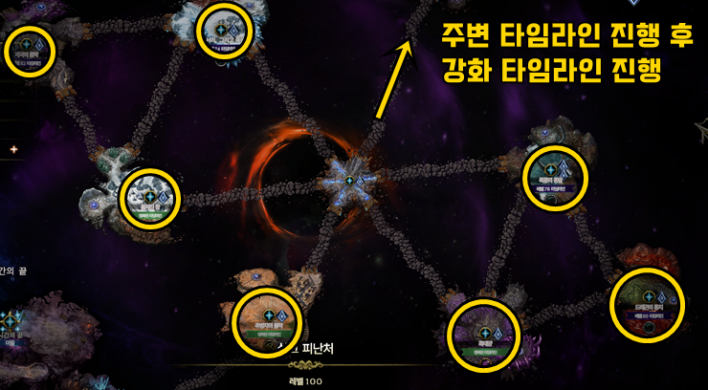
When you first enter the Monolith, your first priority is 'conquering Timelines'. Each region in the endgame is called a 'Timeline', and completing a Timeline grants you Blessings that boost item drop rates or stat buffs.
At first, conquer lower-level Normal Timelines step by step to unlock new ones. After progressing through Normal Timelines and conquering the required Level 90 Timelines, you can enter 'Empowered Timelines' with an area level of 100.
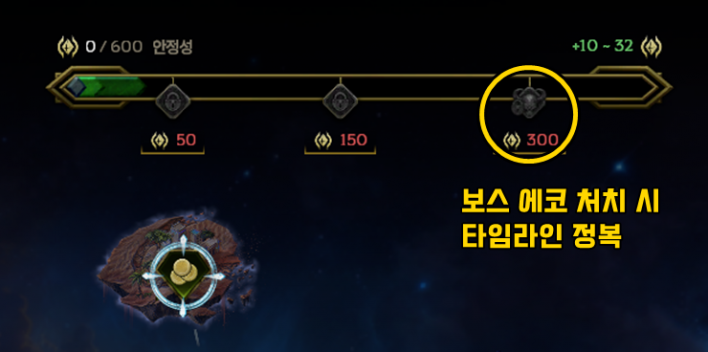
To conquer a Timeline, you must first build up 'Stability' in that Timeline. The small island-like nodes inside a Timeline are called 'Echoes', and clearing an Echo grants Stability. Note that dying inside an Echo forfeits that Echo's bonus Stability and bonus rewards.
Once Stability reaches a certain threshold, you can challenge 'Quest Echoes', leading up to the Timeline's final boss. Defeating the boss lets you choose a Timeline Blessing to gain powerful passive buffs. Dying during a boss fight reduces your Stability, requiring you to run other Echoes again, so try your best to clear it without dying.
This article was originally written in Korean and translated with the help of AI. It was then edited by a native English-speaking editor. All AI-assisted translations are reviewed and refined by our newsroom.
[Read Original]