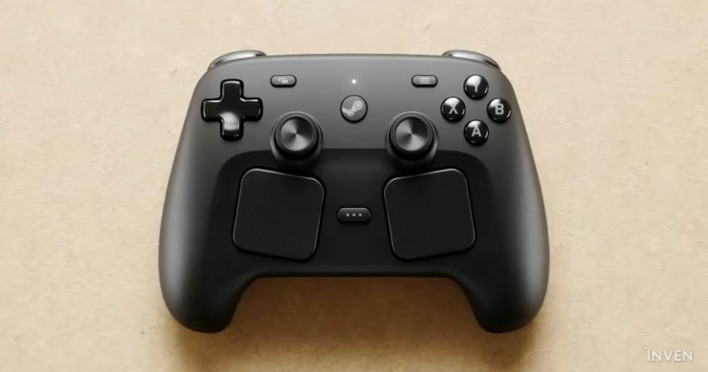
The Steam Controller, which garnered attention as one of three new pieces of hardware from Steam alongside the Steam Machine and Steam Frame, will be the first to reach players in 2026. While it shares its name with the 2015 original, the overall experience and the core of the device have changed significantly.
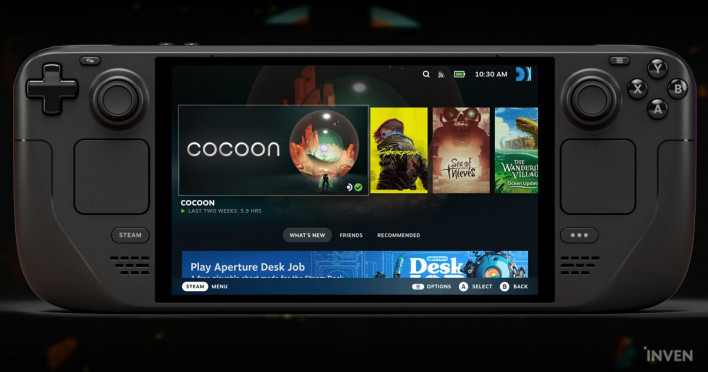
The starting point was to take the Steam Deck and split it in half to create a gamepad, and the addition of every input method required for a standard controller signifies that the Steam Controller is embracing its identity as a conventional gamepad. This is an experience the development team prioritized. At the same time, Valve set a higher goal by inheriting the functionality that made the original Steam Controller successful.
That goal is to provide more choices and flexibility in how games are experienced. We spoke with hardware engineers Steve Cardinali and Jeff Mucha, user experience design engineer Jeremy Slocum, designer Lawrence Yang, and programmer Pierre-Loup Griffais about the choices and changes they made to achieve that experience.
The original Steam Controller was released in 2015. More than a decade later, is there a reason you kept the same name for the new product? Also, what is the biggest difference in experience compared to the 2015 model, and are there any elements you intentionally inherited from the original?
"We learned lessons from the original Steam Controller. The main one was that the next product needed to have all the standard input methods expected of a typical gamepad. We added a second thumbstick and a D-pad to the Steam Deck, and we carried those over to the new Steam Controller. As a result, the new device makes it much easier to enjoy games designed for standard gamepads compared to the original.
Even so, the original Steam Controller provided advanced control methods that allowed for new ways to play keyboard/mouse-centric games. We are still very proud of that level of refinement. We definitely wanted to inherit the trackpads, gyro, and grip buttons this time as well. Once you get used to these features, your control performance can be significantly improved compared to traditional joystick-only devices.
The new Steam Controller has more in common with the Steam Deck's trackpad experience than the 2015 model. Did user feedback from the Steam Deck influence the design? Also, I personally have small hands but found it relatively comfortable to hold; were there specific considerations for improving the grip?
"The first thing we did when designing the Steam Controller was to split the Steam Deck in half and try using those two pieces together like a controller. It worked quite well, but we wanted a higher level of comfort and a more familiar design for the new controller.
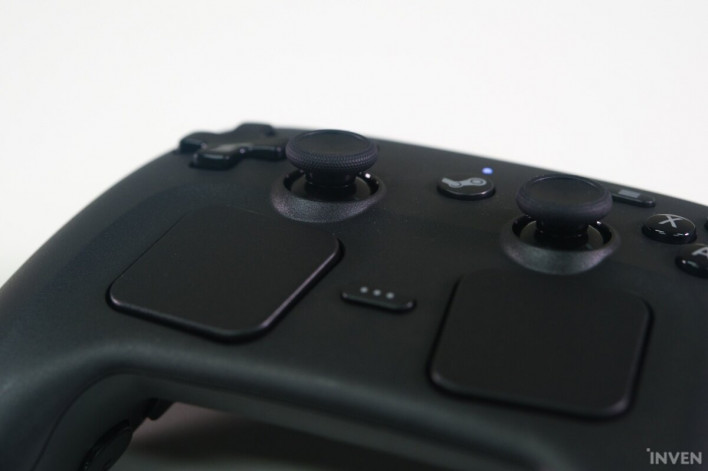
We wanted it to feel like a more traditional controller. We started the design from scratch and, through numerous iterative playtests, created a form factor that is comfortable for all hand sizes while ensuring the inputs are easily accessible. Optimizing for smaller hands was particularly difficult, and we had to adjust the input layout compared to the Steam Deck. For example, you might notice the thumbsticks are positioned slightly lower than the D-pad and button pad compared to the Steam Deck.
Another noticeable difference is that the trackpads are tilted toward the hands. Originally, we placed them flat like on the Steam Deck, but we discovered that because the wrist angle changes due to the controller's smaller form factor, keeping the trackpads horizontal actually makes them harder to reach and uncomfortable to use. So, we adjusted the trackpad angle to match the natural range of motion of the thumb.
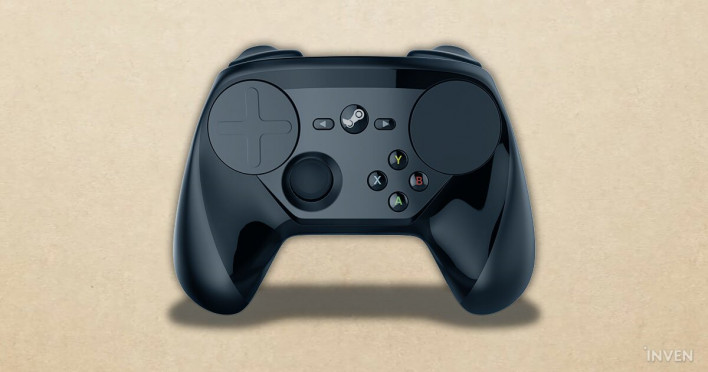
Unlike the Xbox controller or the Nintendo Switch Pro Controller, the Steam Controller uses a symmetrical layout for the analog sticks, similar to the DualSense. What is the reason for this?
"When we added the second thumbstick and D-pad from the original Steam Controller to the Steam Deck, the space required for inputs increased significantly. In the process of finding a layout that was comfortable and easy to use for all hand sizes, we carefully considered an asymmetrical layout. However, that caused issues with frequent accidental inputs and reduced trackpad accessibility. The Steam Deck's symmetrical layout was the optimal solution that satisfied both the required number of inputs and our standards for convenience and usability.
We wanted people to be able to use the muscle memory they built on the Steam Deck immediately with the new Steam Controller, and maintaining the symmetrical layout aligned with that goal.
Thanks to my long experience with the Steam Deck, I had zero adjustment period. However, there is definitely a learning curve for users encountering trackpads for the first time, as was the case when I first used the Steam Deck. What are you preparing to lower the barrier to entry?
"We are well aware that for many players, the Steam Controller's trackpads are a new experience. The combination of the trackpads and the Steam Input configuration tool provides a wide range of flexibility to enjoy games however you want. We also know that it can be dense and complex. Therefore, we plan to release tutorial and user guide content in the near future that explains how to use the trackpads and various advanced input features. We hope the upcoming tutorials will open the door for users to try things out for themselves.
TMR-based thumbsticks have been introduced; could you explain that technology in more detail? Also, are there other areas you focused on to improve overall durability beyond the sticks?
"TMR stands for Tunnel Magnetoresistance, a sensor technology that detects the position of the thumbstick using changes in a magnetic field. Each axis of the thumbstick has an electrical sensor component that combines a TMR sensor element with an integrated signal conditioning circuit, outputting a voltage that the microcontroller can detect. Conventional thumbsticks use a carbon wiper sensor, which creates friction every time you move the stick, leading to reduced signal accuracy over time and what is known as 'stick drift.'
By switching to a non-contact magnetic sensor method via TMR, we eliminated wear factors and improved the feel. Furthermore, because TMR technology maintains higher precision throughout the lifespan of the thumbstick, we can set tighter dead zones and increase in-game responsiveness. In terms of durability, we always set high targets. Our goal was not to focus on just one part, but to ensure that every component works reliably. Furthermore, we designed it to be easy to disassemble and repair.
What are your plans for repair services and customer support if hardware issues occur?
"We plan to handle customer support in the same way as our other hardware products. If a hardware issue occurs, please contact Steam Customer Support.
The controller supports gyro input via 'Grip Sense.' Could you explain exactly what role this feature is intended to play and how it came to be included?
"We have learned a lot from the passionate core community regarding gyro controls and the games that use them. They have conducted various experiments showing how intuitive and competitive gyro aiming is in fast-paced games. One key element is a means to quickly enable or disable the gyro to reset your position when you reach the end of a comfortable range of motion. This is called 'ratcheting,' similar to lifting a mouse and moving it back to the center of the pad after sliding it to the edge.
We were already providing several methods through Steam Input and the controller, but we wanted to add one more to the grip area. The idea of putting a touch sensor on the grip came from a Valve engineer who is particularly passionate about gyro aiming. During the time the development team was designing the system, they came to our team's desks and explained the value and optimal usability of this feature. The hardware team agreed with the idea, and we actually implemented it in this Steam Controller.
Because Valve considers the gyro to be very important overall, its inclusion in the controller was a given from the start. However, please understand that this specific sensor location stems from our desire to support the growing gyro gaming community.

When I first used Grip Sense, enabling the gyro felt surprisingly intuitive. I also learned that it can be mapped like a regular button; could you explain more?
"That flexibility comes from the power of the Steam Input configuration tool. We conceived Grip Sense as a means to activate the gyro, but we eventually concluded that it is simply another type of button and can be utilized as such. Using the configuration tool, you can freely map functions to any input. In our experiments with Grip Sense, we found it particularly fun to map it to buttons for opening in-game maps, quick-selecting weapons on a weapon wheel, or even pausing the game (where the game pauses when you set the controller down).
We look forward to seeing gamers who love to tinker and customize find new, creative ways to use Grip Sense and share them with the community.
The Steam Controller 'Puck' was quite impressive. What was the motivation for introducing it, and what core experience did you want to deliver?
"When we conducted internal tests with early prototypes of the Steam Controller, we only supported Bluetooth, and the experience varied wildly among colleagues. Some testers had a great signal, while others had a terrible one. People's wireless environments and PC setups are all different, and it was difficult to provide the consistent wireless experience we wanted with Bluetooth alone. Furthermore, Bluetooth latency increases as more devices are connected.
The Steam Controller Puck is a wireless receiver based on a fast and stable 2.4GHz protocol, which solves most of the variability issues mentioned earlier. With the Puck, you can just plug it into your PC and turn on the Steam Controller to start playing immediately. We wanted to keep the Puck away from the PC because there are often many peripheral USB devices on the back of a PC that cause interference, so we added a USB cable. We also added a charging function to the Puck, achieving two goals at once. You can charge the controller easily and conveniently just by placing it on top of the Puck.
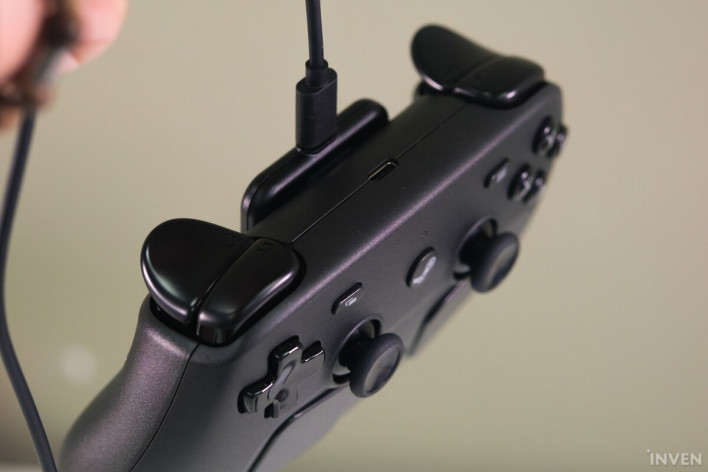
Why did you choose a magnetic pin attachment method instead of a traditional cradle?
"We know there are large docks that wrap around controllers, but we wanted to keep the size small to maximize desk space. We also know there is a community of makers and third-party accessory developers who support products with various ideas. Keeping the Puck small gives users more flexibility to customize their setup as they wish.
There are a lot of input buttons to utilize, such as trackpads and back grip buttons. The customization potential is impressive but can feel a bit daunting. Does Valve plan to release official Steam Controller layouts for specific games, or provide guidelines so developers can create them themselves?
"The Steam Input system and configuration tool have been consistently developed and provided to both users and developers for some time. Thanks to this, there are many community resources that cover how to use them in addition to our own documentation. We also provide example templates that can be applied to any game based on the control scheme the game uses, and sometimes we coordinate the default settings for games as well. There are also many existing community settings that can serve as a starting point.
We also plan to release a user guide to help users get started with the configuration tool.
Can we use layouts created by the community for the original Steam Controller?
"Through continuous work across the Steam Input configuration, we are still supporting the original Steam Controller. Community layouts for the original Steam Controller remain usable. Since the 2026 Steam Controller has input parity with the Steam Deck, it will primarily utilize Steam Deck layouts. It is, of course, possible to apply 2015 Steam Controller settings to the 2026 model in Steam Input. However, because the input configurations of the two devices differ, there may be differences in how they are utilized.
Many games automatically switch UI based on the detected input type. If I map a trackpad to mouse input, there is an issue where the game UI keeps switching between keyboard+mouse UI and controller UI. Do you have any ideas to solve this?
"There are a few ways to solve this. The key is to ensure that all inputs are unified into either controller mode or keyboard+mouse mode. We provide an option to map the gyro and trackpads to a joystick, which allows the game to recognize them as a joystick rather than a mouse. There is also an option to have the entire controller recognized as a mouse+keyboard. These two methods solve the UI flickering issue.
At the same time, we are continuously communicating the benefits of supporting these 'mixed input' devices to developers.

The controller works on Windows and macOS and supports mobile pairing. Do you plan to provide the same experience on devices like mobile or Apple TV? Also, what are your plans for third-party platform support?
"The Steam Controller is designed to be used on systems that can run Steam or the Steam Link app. It is fully supported on all devices that can run the Steam Link app.
DualSense and Xbox controllers are already officially supported by Steam and are widely available. In that situation, what is the core value of the Steam Controller? Why should players choose this controller?
"If you are already enjoying the games you want with an existing controller, that is great. The Steam Controller is equipped with features that allow you to play a wider variety of games and increase control responsiveness even in games designed for traditional controllers. We also emphasize that it integrates seamlessly with PC, Steam Deck, and Steam Machine wake-up functions, as well as OS/desktop navigation.
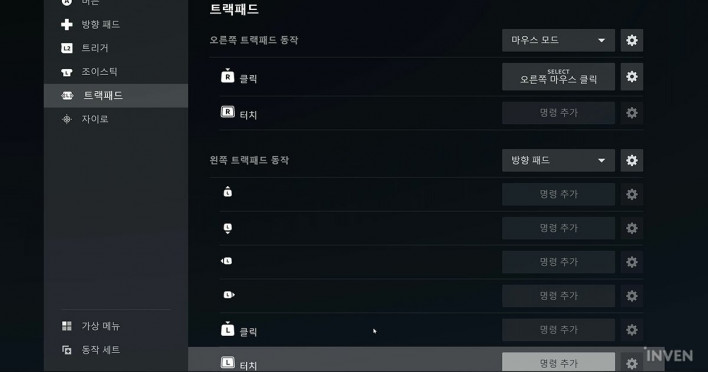
With mouse-level input becoming possible from the couch, the Steam Controller opens the door to a true living room PC experience. With the Steam Machine and Steam Frame also launching soon, what is Valve's vision for the entire hardware ecosystem?
"We are always interested in introducing products and features that can give users more choices and flexibility in how they experience the games they love. We hope this will allow them to play games that were previously difficult to enjoy.

Sort by:
Comments :0